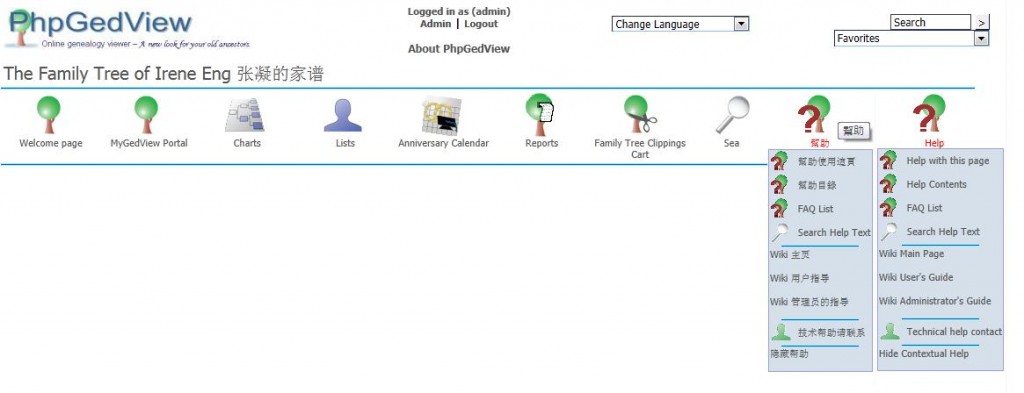
Search 搜索
Posted: October 16, 2011 Filed under: Screenshots 图解 Leave a comment »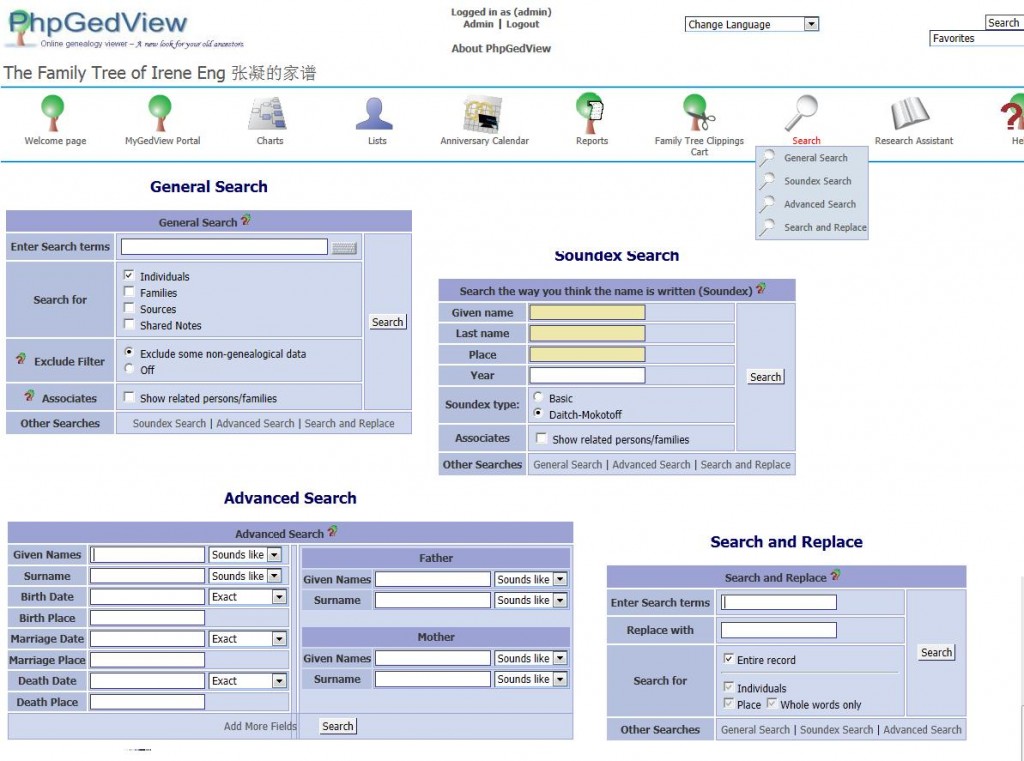
.
- General Search
- Soundex Search
- Advance Search
- Search and Replace
Family Tree Clippings Cart 收集箱功能
Posted: October 16, 2011 Filed under: Screenshots 图解 Leave a comment »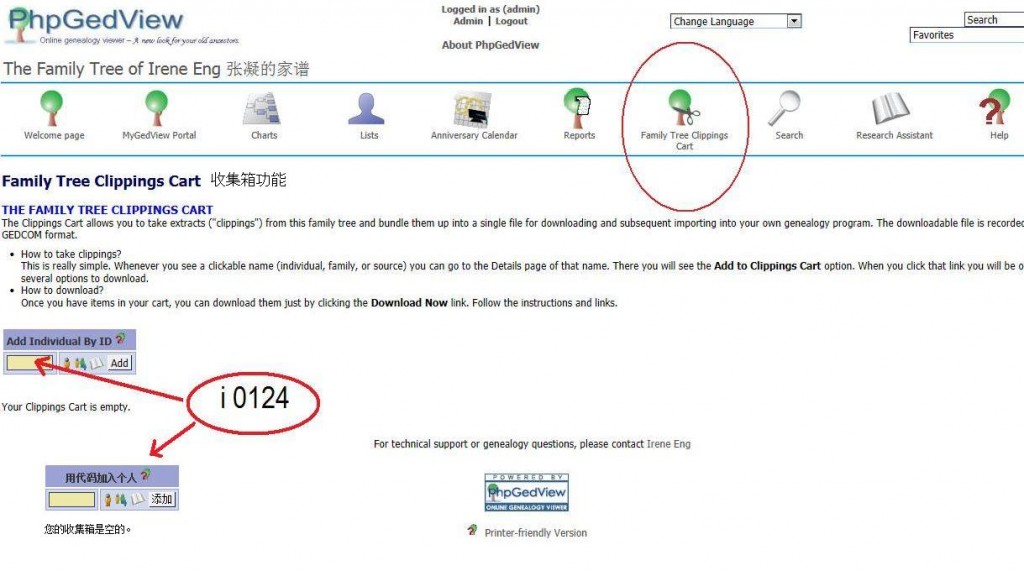
.
Family Tree Clippings Cart 收集箱功能
THE FAMILY TREE CLIPPINGS CART
The Clippings Cart allows you to take extracts (“clippings”) from this family tree and bundle them up into a single file for downloading and subsequent importing into your own genealogy program. The downloadable file is recorded in GEDCOM format.
- How to take clippings? This is really simple. Whenever you see a clickable name (individual, family, or source) you can go to the Details page of that name. There you will see the Add to Clippings Cart 加入到图片收集 option. When you click that link you will be offered several options to download.
- How to download? Once you have items in your cart, you can download them just by clicking the Download Now link. Follow the instructions and links.
Slow
Posted: October 16, 2011 Filed under: Questions 问题 Leave a comment »My PGV app runs slow on my computer, especially while editing.
I don’t know why your PhpGedView edits should be so slow. Do you have a large number of people in the database? If you do, the slowness could be because you probably have the “Synchronize edits into GEDCOM file” option turned on. This is in the GEDCOM configuration file, “Edit Options” section, second option from the top. The Help text for this option needs updating. When this option is on, PGV will have to copy the GEDCOM for every change you make to the database. This will definitely eat up a lot of time.
Nov 11, 2011
MyGedview Portal” menu
“Manage GEDCOMs and edit Privacy” option.
“Edit” in the “Configuration file” line.
You’re looking for the “Edit Options” section, which is 4th from the end.
A reply from the forum, Oct 7, 2011.
There are two possible reasons for slow edits:
(a) You don’t have the system set to automatically accept your edits.When this option is set to “No” (you find it in your account details when you are logged in as Admin), all of your edits are stored in a file instead of being recorded directly in the database. The edits are copied to the database (and the file is erased) when you accept them. This slows things down because the program has to first fetch the information from the database and then match what it finds against the file of pending changes so that you can see what has not yet been copied to the database.
You would ordinarily set the system to auto-accept changes made by users whom you trust to enter the new information correctly. You, yourself, should be one of these “trusted” users. You would normally not auto-accept changes made by untrusted users because this gives you a chance to avoid making disastrous database changes that would be very hard to undo.
(b) You have the system set to synchronize database edits with the GEDCOM. You find this option in the GEDCOM configuration, Edit section.
When this option is set to “yes”, every change to the database is copied to the GEDCOM, one change at a time. This results in a lot of file activity on the server. If you have a large GEDCOM with many people in it, you would notice a significant slow-down, especially if the server you are using isn’t very fast to begin with. You would not normally need to have this option set to “yes”. You set it to “yes” so that you can be sure that the GEDCOM is always up-to-date and can be safely re-imported into the database.
Another reason for system slowness might simply be that the program isn’t being allowed to use enough memory. This possibility should be investigated. Log in as Admin, call up the menu of Admin options, and click on the “PHP information” option near the top right of the list of option. In the long display of PHP settings, look for the line that gives the memory limits. Tell me what the two values shown there are. (Use the browser’s “search in page” function to look for “memory_limit”)
Login as admin. Under the “MyGedview Portal” menu, click on the “Manage GEDCOMs and edit Privacy” option. Click “Edit” in the “Configuration file” line. You’re looking for the “Edit Options” section, which is 4th from the end.
The 128M and 90M should be more than enough for a database with 1,300 people in it. It should actually be enough to handle up to about 5,000 people.
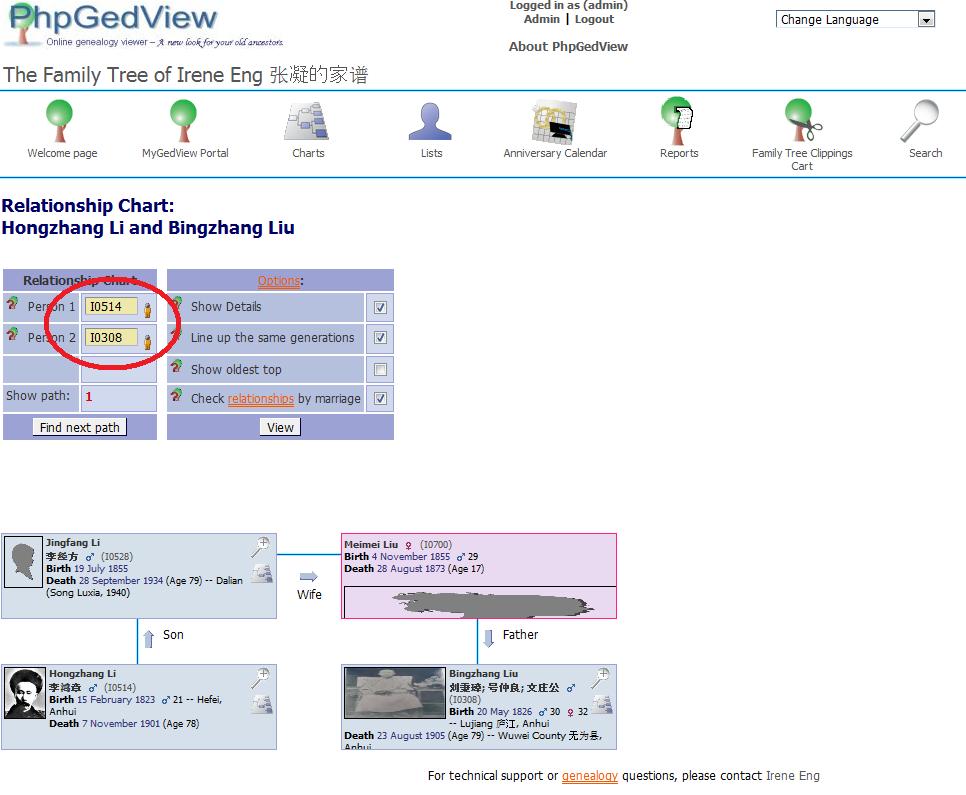
Relationship Chart
Posted: October 14, 2011 Filed under: Screenshots 图解 Leave a comment »Checking a relationship between two people:
.
Anniversary Calendar 周年纪念日历
Posted: October 14, 2011 Filed under: Screenshots 图解 Leave a comment »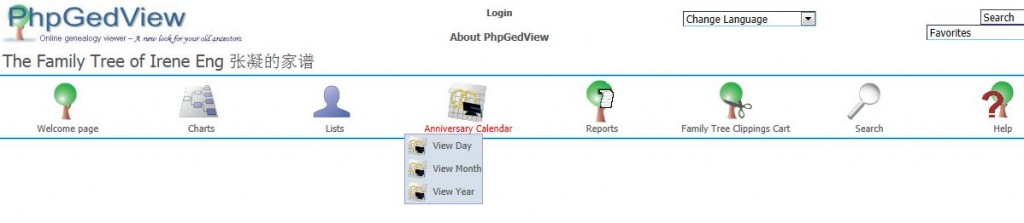
List:
- View Day 查看日
- View Month 查看月
- View Year 查看年
Admin page 管理
Posted: October 14, 2011 Filed under: Screenshots 图解 Leave a comment »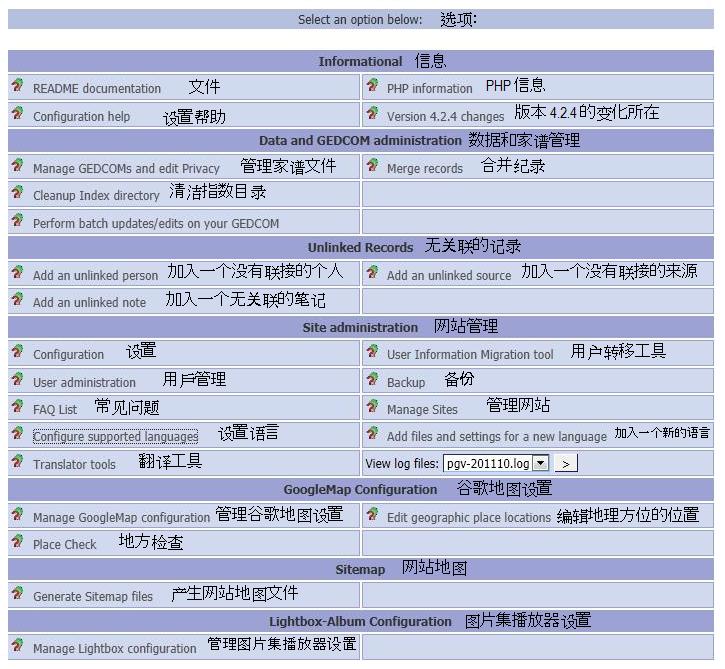
Information 信息
- README documentation 文件
- Configuration help 设置帮助
- PHP information PHP信息
- Version 4.2.4 changes 版本 4.2.4 的变化所在
Data and GEDCOM administration 数据和家谱管理
- Manage GEDCOMs and edit Privacy 管理家谱文件 Edit Privacy
- Cleanup Index directory 清洁指数目录
- Perform batch updates/edits on your GEDCOM
- Merge records 合并纪录
Unlinked Records
- Add an unlinked person 加入一个没有联接的个人
- Add an unlinked note 加入一个无关联的 笔记
- Add an unlinked source 加入一个没有联接的来源
Site administration 网站管理
- Configuration 设置
- User administration 用戶管理 Access Level
- FAQ List 常见问题
- Configure supported languages 设置语言
- Translator tools 翻译工具
- User Information migration tool 用户转移工具
- Backup 备份
- Manage Sites 管理网站
- Add files and settings for a new language 加入一个新的语言
- View log files:
GoogleMap Configuration 谷歌地图设置
- Manage GoogleMap configuration 管理谷歌地图设置
- Place Check 地方检查
- Edit geographic place locations 编辑地理方位的位置
Sitemap 网站地图
- Generate Sitemap files 产生网站地图文件
Lightbox-Album Configuration 图片集播放器设置
- Manage Lightbox-Album Configuration 管理图片集播放器设置
Importing my old tree 输出/入 旧家谱
Posted: October 14, 2011 Filed under: Action, Screenshots 图解 Leave a comment » I’ve been using Family Tree Maker since 2003 (June 26, 2003, version 11). FTM sells a new version every year to update. As of now, its onto 2012 at $39.99. To start new (a new user), the Family Tree Maker 2012 Complete cost $79.99.
Converting my FTM file into gedcom format:
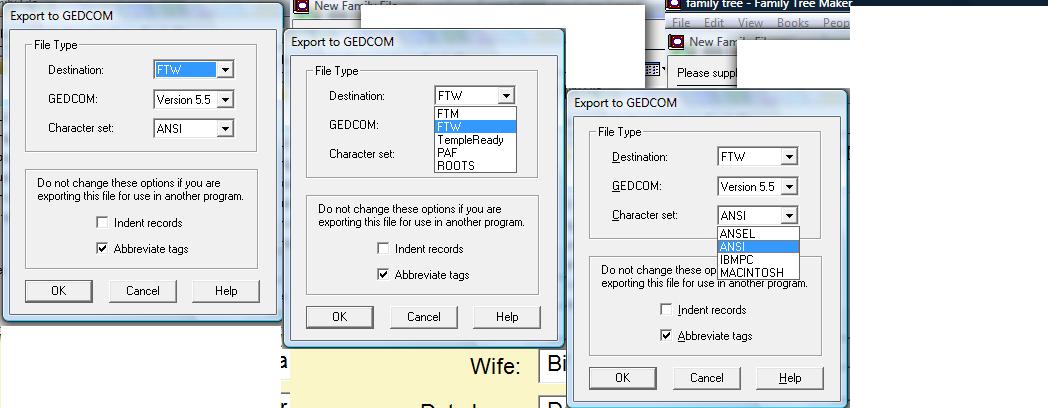
1. From The File menu, select Copy/Export Family File.
2. Click the Save as type drop-down list and select GEDCOM (*.GED) – the red arrow.
3. click Save. FTM display the Export to GEDCOM dialog box – the red circle.
– Destination: FTM
– GEDCOM: Version 5.5
– Character set: ANSI
.
Import gedcom into PGV (version 4.2.4 as of Oct 14):
I’m using DreamHost, here is what
Database Type: MySQL
Database Host: mysql.try.ireneeng.com (NOT localhost)
Database Username: tryireneengcom
Database Password: gFGhmY8t
Database Name: try_ireneeng_com
Use persistent database connections: Yes (NOT no)
The front page banner 头版面
Posted: October 14, 2011 Filed under: Screenshots 图解 Leave a comment »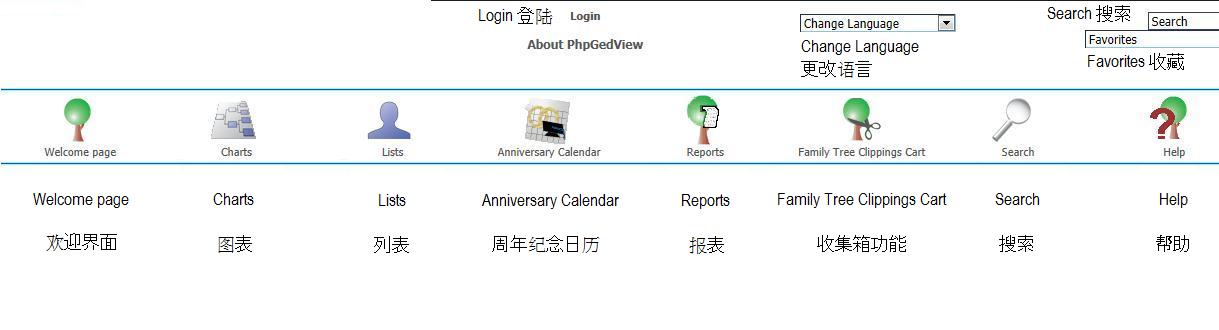
.
- Login 登陆
- Change Language 更改语言
- Search 搜索
- Favorites 收藏
.
The working area/page of Individual and Family: you’ll be spending all your time here, updating, adding .. have fun.
.
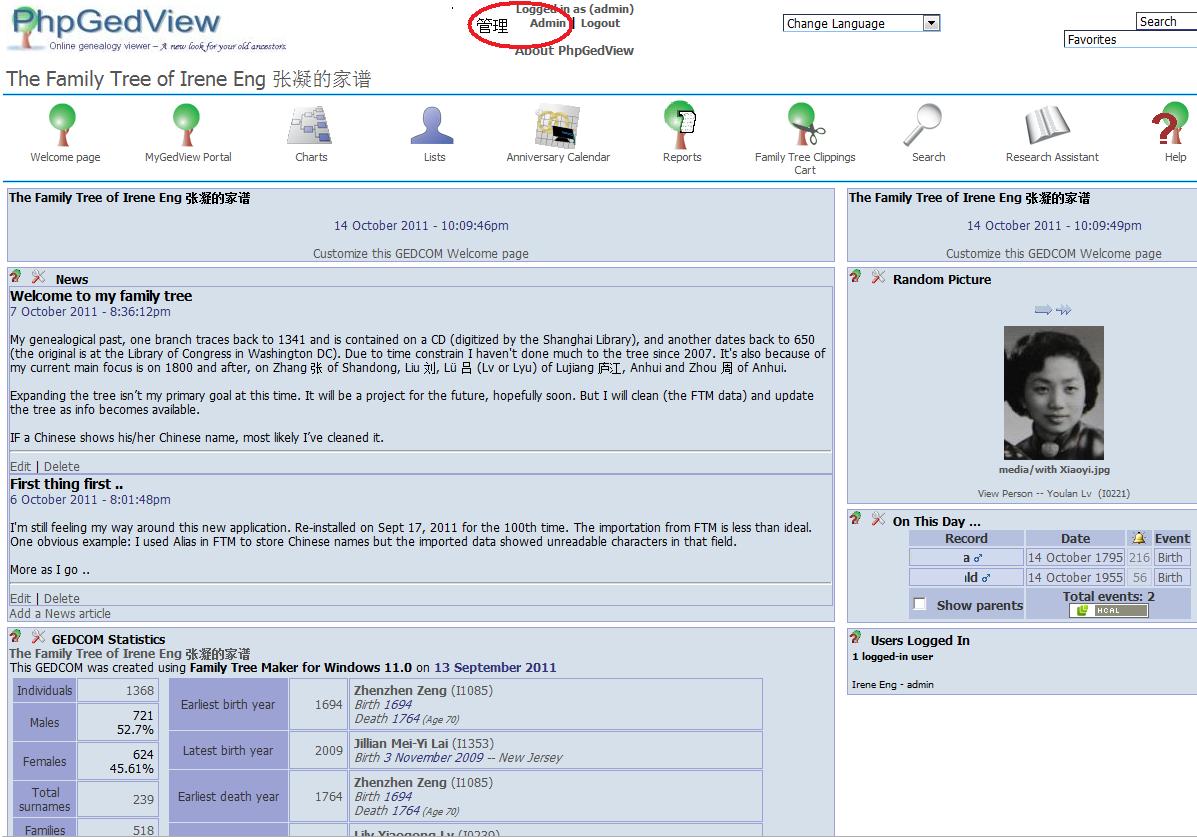
- Welcome Page 欢迎界面
- Charts 图表
- Lists 列表
- Anniversary Calendar 周年纪念日历
- Reports 报表
- Family Tree Clippings Cart 收集箱功能
- Search 搜索
- Research Assistant 资料调查助理
- Help 帮助
Recent Comments